If you are trying to find the best scrolling text app, you are probably already close to downloading one. The real question is not which app has the most effects. It is which app helps you put a clear, readable message on your phone screen in seconds and actually works when you need it in real life.
That usually means a fullscreen display, fast editing, readable text, and controls that let you adapt the message to the environment. A scrolling text app is most useful when you are at an airport pickup, in a loud crowd, at an event, behind a shop counter, or anywhere a visible message works better than speaking.
For most people, the best option is the app that gets out of the way and makes the message easy to see. That is where LED Scroll Display is designed to help: fast setup, strong visibility, and the controls that matter when you want your phone to act like a compact LED sign.
If you only want the short recommendation, choose the app that lets you type fast, switch to fullscreen immediately, and adjust size, speed, direction, and contrast without friction. That is the difference between an app you install and forget and one you actually use when it counts.
Quick answer: what makes a scrolling text app or LED scroller app the best?
If you just want the short version, the best scrolling text app should give you:
- fullscreen mode
- quick message editing
- speed control
- text size control
- color and background options
- direction settings
- readable fonts and styling
- a clean workflow you can use on the spot
Those features matter more than novelty effects. In practice, the best app is the one that helps people read the message quickly without making you fight the interface first.
If an app does those basics well, it is already a strong candidate. If it does not, extra visual effects will not save it.
Many people use different names for the same category here: scrolling text app, LED scroller app, LED banner app, or phone sign app. The label matters less than the result. The best option is the one that helps you create a visible message quickly in a real setting.
Table of contents
- What most people actually need from a scrolling text app
- The features that matter most in real use
- How to compare scrolling text apps before you install
- A simple scoring checklist
- Why LED Scroll Display stands out
- When a scrolling text app is worth downloading
- How to choose the right app for your situation
- FAQ
What most people actually need from a scrolling text app
Many comparison articles make this more complicated than it needs to be. Most people are not looking for a novelty app. They are looking for a quick way to turn their phone into a visible sign.
That means the app should help with practical outcomes like:
- making a pickup sign people can read from a distance
- displaying a birthday or celebration message
- showing a shop or counter notice
- communicating in noisy spaces
- creating an LED-style message for events or social videos
If the app cannot help you do those things quickly, it does not matter how many decorative features it includes. That is the simplest way to judge whether an app deserves a download.
The features that matter most in real use
The best scrolling text app is usually not the one with the longest feature list. It is the one that gets the fundamentals right.
Fullscreen mode
This is the first non-negotiable feature. A scrolling text app should make your message occupy the screen clearly, without extra interface clutter around it.
Fullscreen mode is what turns the phone from a normal app screen into something that feels like a real mini LED display.
Fast editing
You should be able to open the app, type a message, and show it almost immediately. That matters more than people think because many real use cases are spontaneous.
If you need to make too many decisions before the text is visible, the app becomes less useful in the exact moments when it should shine.
Speed and direction controls
Scrolling text is only useful if people can actually read it. That is why speed control matters so much. Text that moves too fast is frustrating, and text that moves too slowly can lose impact.
Direction controls also help because not every message works best with the same movement pattern.
Text size and readability
Large readable text is the whole point. Good apps make it easy to increase the text size and keep the message legible from farther away.
This matters especially for:
- pickup names
- short announcements
- offers or promotions
- event messages
Colors, backgrounds, and contrast
Brightness alone is not enough. What matters is contrast. A good scrolling message app should let you create combinations that stay visible in different environments, especially indoors, at night, or in crowded places.
Styling without friction
Some personalization is useful, but it should not slow you down. Font, bold styling, simple backgrounds, and visual adjustments are helpful when they improve clarity or help the message fit the context.
The best apps treat styling as a quick improvement, not a barrier to getting started.
Quality signals that separate a useful app from a generic one
Feature lists are not enough on their own. A lot of apps in this category promise the same basics, so the better test is how the app feels under mild pressure.
Look for signals like:
- the first usable message appears quickly
- the editor is not cluttered
- the full-screen result looks intentional
- the main controls are easy to find without guessing
- the app feels useful for more than one situation
These are the details that often separate a practical utility from an app that only looks good in store screenshots.
How to compare scrolling text apps before you install
If you are deciding between a few options, use this simple filter before you download anything.
1. Can you get from blank screen to fullscreen message fast?
This is the fastest way to spot whether the app is practical or just flashy. If it takes too many taps to show a message, it will feel slow in real use.
2. Does it help the message stay readable?
The app should make readability easier, not leave it up to luck. Size, speed, contrast, and direction should be obvious to control.
3. Is it useful for more than one scenario?
A strong scrolling text app should work for pickup signs, events, celebrations, shops, and quick announcements. That versatility usually tells you the product is designed around real needs rather than one gimmick.
4. Would you keep it installed?
This is a surprisingly good buying filter. If the workflow feels fast and useful, the app becomes something you keep for future use instead of something you delete after one try.
That matters because the best scrolling text app is rarely a one-time novelty. It is a lightweight utility you can reuse for pickups, events, counters, birthdays, travel, and quick public messages.
A simple scoring checklist
If two apps look similar in the store, score them by the parts that matter once you are actually using the phone as a sign.
| Quality signal | Why it matters | Good sign |
|---|---|---|
| Time to first message | shows whether the app is practical | you can type and display text quickly |
| Fullscreen output | removes interface clutter | the message fills the screen cleanly |
| Speed control | protects readability | the text can be slowed without guesswork |
| Text size control | helps at distance | large text remains clear |
| Contrast options | works in real environments | bright text and dark backgrounds are easy |
| Reuse flow | matters after the first use | previous settings are easy to adjust |
The best choice does not need to win every category with the most features. It needs to pass the real-use test: can you create a readable message quickly, show it fullscreen, and adjust it without fighting the interface?
Red flags before you download
Some scrolling text apps look fine at first glance but are weak in practical use.
Watch out for:
- screenshots that show effects but not readable fullscreen text
- controls hidden behind too many menus
- no clear way to slow the text down
- text that looks decorative but hard to read
- too much focus on novelty effects before basic visibility
Those issues matter because this category is often used in a hurry. A flashy app that takes too long to configure is less useful than a simpler app that gets the message visible right away.
Why LED Scroll Display stands out
LED Scroll Display is especially strong when you care about real-world usability, not just the idea of scrolling text.
It is built around the actions people actually want:
- type a message quickly
- make it readable
- customize the speed and direction
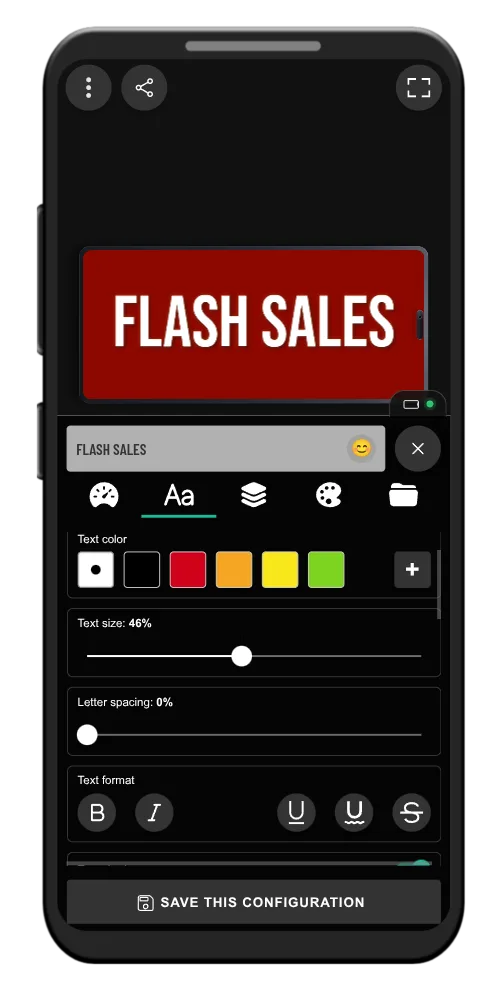
- adjust colors and styling
- switch to a clean fullscreen display
That makes it practical for both quick one-off moments and repeated use. You can use it in a spontaneous situation, but you can also refine the look when you want a message to feel more polished or more attention-grabbing.
For someone comparing apps right before installing, that balance matters. You want something simple enough to use immediately but flexible enough that it still feels worth keeping.
It focuses on the features that affect visibility
The strongest point is not just that you can make text scroll. It is that you can control the things that affect whether the message works in the real world.
That includes readability, speed, direction, presentation, and how quickly you can go from idea to fullscreen display.
For a commercial-intent search like "best scrolling text app," that matters more than having a long list of novelty effects. People searching this term usually want a tool they can trust for a visible result right away.
It works for more than one use case
Some people need a pickup sign. Others want a party message, a shop notice, or a concert banner. A good scrolling text app should not feel locked to one narrow scenario.
LED Scroll Display works well across those different moments because the message can be adjusted quickly without rebuilding everything from scratch.
It reduces the risk of choosing the wrong app
One of the biggest frustrations with lightweight utility apps is downloading something that technically works but feels clumsy the moment you try to use it for a real situation.
LED Scroll Display reduces that risk by covering the basics well: fast setup, clear controls, fullscreen output, and flexible visual adjustments. That is exactly what people are usually trying to validate before they install.
In other words, it fits the real buying criteria behind this search, not just the surface keyword.
When a scrolling text app is worth downloading
If you only want to type one static sentence once, you might be tempted to use your notes app instead. But the moment visibility matters, a dedicated app becomes the better tool.
A scrolling text app is worth downloading when you want:
- better visibility than a plain note
- motion that attracts attention
- faster readability from a distance
- quick changes without rebuilding the message
- a result that looks deliberate instead of improvised
That is why so many of the strongest use cases are practical rather than playful. The app saves time and produces a better result at the same time.
If you are new to this use case, How to Make Scrolling Text on Your Phone in Minutes is the best companion guide for the step-by-step setup.
If you already know you want a dedicated app, the main question is simpler: does this app help you create a visible message faster than the alternatives? That is the standard worth using.
How to choose the right app for your situation
Different users care about slightly different things, but the decision usually becomes clear if you ask a few simple questions.
Do you need quick setup or deep customization?
Most people need both, but quick setup should come first. If the app is hard to use under time pressure, advanced settings do not help much.
Will people read the message from a distance?
If yes, prioritize large text, contrast, and fullscreen presentation over decorative effects.
Will you reuse it often?
If you expect to use it for pickups, events, shops, or personal messages more than once, it is worth choosing an app that feels smooth enough to keep installed.
Does the app help you get a better result fast?
This is the most important filter. A good scrolling message app should reduce friction, not add it.
If you answer those questions honestly, the "best" app usually becomes obvious. It is rarely the one with the longest feature list. It is the one that helps you get a bold, readable fullscreen result with the least effort.
A practical recommendation
If your goal is to create a visible, customizable phone message quickly, the best scrolling text app is usually the one that keeps the workflow simple and the display clear.
LED Scroll Display is a strong choice because it focuses on the parts that matter most in real use: visibility, speed, fullscreen presentation, and flexible customization without unnecessary complexity.
It is especially worth trying if your use case is practical rather than purely decorative. Pickup signs, event messages, shop notices, birthday banners, and quick public-facing messages all benefit from an app that is built to be readable first.


If you want the fastest path, install the app, type a short message, increase readability, and test it in fullscreen mode. In less than a minute, you can tell whether it solves the problem better than a notes app or a workaround.
That is the key conversion test for this category: if the app helps you create a cleaner, more visible message immediately, it is already doing what the best scrolling text app should do.
If you want a practical recommendation rather than a long comparison, start there. A fast real-world test is more useful than reading another generic feature list.