To read a script naturally on camera, stop treating it as a paragraph you must pronounce perfectly. Write in short spoken thoughts, place the text close to the lens, set a pace that leaves room to breathe, and rehearse the meaning before you record. A teleprompter should remind you what comes next; it should not drag your voice from word to word.
The techniques below work for YouTube videos, TikToks, Reels, online courses, product demonstrations, presentations, and talking-head videos. You can use them with notes beside a camera or with the free online teleprompter when you need the full wording in front of you.
Why reading a script often sounds robotic
Most unnatural delivery begins before the camera turns on. The script was written to look polished on a page rather than to sound believable in a room. The speaker then tries to preserve every word, follows a fixed scroll, and has no attention left for the viewer.
| What the viewer notices | Likely cause | First correction |
|---|---|---|
| Every sentence has the same rhythm | The script has no marked beats or pauses | Divide it into separate thoughts |
| Your eyes move from side to side | The text is too wide or too far from the lens | Narrow and reposition the reading area |
| You rush at the end of lines | The scroll is leading your voice | Slow the scroll and shorten the copy |
| Correct words but little expression | You are concentrating on accuracy | Rehearse the intention of each section |
| Frequent restarts after small mistakes | You expect a perfect word-for-word take | Allow natural substitutions that preserve meaning |
The goal is not to hide the existence of a script at any cost. It is to direct your attention back toward the person watching.
1. Rewrite the script for the ear
Written language often contains longer introductions, complete transitions, and clauses that are easy to scan but difficult to say. Spoken language uses contractions, shorter sentences, and occasional fragments.
Compare these two versions:
Written: “In this video, I am going to explain three methods that can help you improve the way in which you present scripted content on camera.”
Spoken: “If your script sounds stiff on camera, try these three changes.”
The second version reaches the subject sooner and gives the speaker fewer words to manage. Read every paragraph aloud before recording. If you stumble over the same sentence twice, rewrite it. The problem is probably the sentence, not your delivery.
If you are still drafting, the seven structures in our TikTok script template guide also work as starting points for longer short-form videos.
2. Break paragraphs into thought units
Do not display a dense paragraph and hope your voice discovers the phrasing. Break the script wherever one idea ends, the emotion changes, or you want the viewer to absorb a point.
Instead of this:
Most people try to sound natural by memorising every word, but that usually makes the first take tense, so write for the ear, keep each sentence short, and let the thought land before continuing.
Format it like this:
Most people try to sound natural by memorising every word.
That usually makes the first take tense.
Write for the ear. Keep each sentence short.
Let the thought land before you continue.
Each block should contain one action: make a claim, explain it, demonstrate it, or move to the next point. This gives your eyes a useful chunk to recognise and your voice a clear destination.
3. Add pauses where the meaning needs space
A natural speaker does not leave identical gaps between identical-length sentences. We pause to breathe, emphasize a result, change scenes, show an object, or let an important line settle.
In the browser teleprompter, you can place two kinds of cue directly inside the script:
[wait:3]stops the scroll for three seconds and then continues automatically. Change3to the number of seconds you need.[pause]stops indefinitely. Press play or the Space key when you are ready to continue.
Use timed waits for predictable actions such as showing a before-and-after image. Use a manual pause when the timing depends on a demonstration, another speaker, or your own delivery.
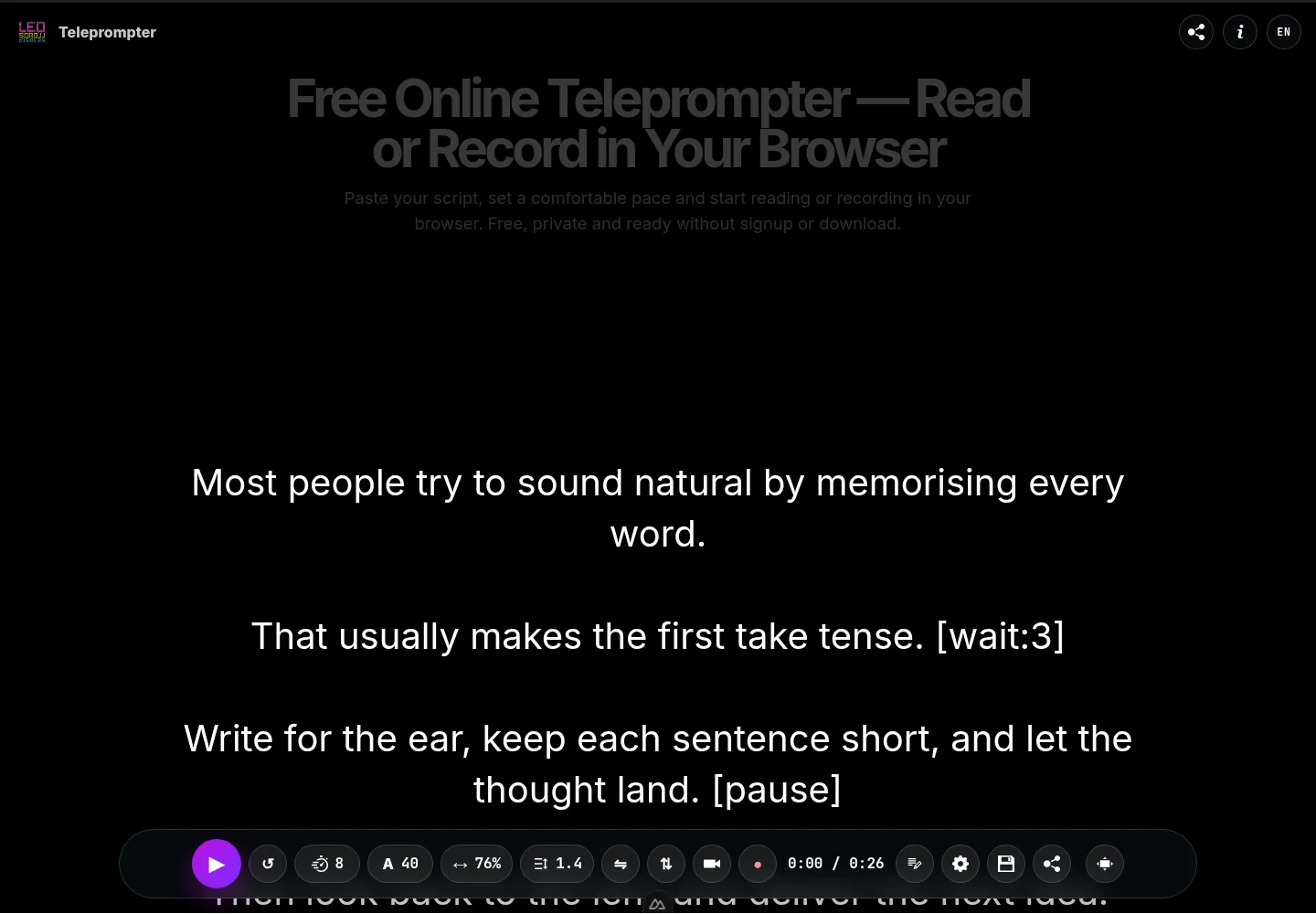
Here is a short practice script with both cues:
Most people try to sound natural by memorising every word.
That usually makes the first take tense. [wait:3]
Write for the ear, keep each sentence short, and let the thought land. [pause]
Then look back to the lens and deliver the next idea.
Open this practice script in the teleprompter
Do not add a cue after every line. Too many planned silences become another mechanical pattern. Mark only the moments that need a deliberate change.
4. Make the scroll follow your voice
The most common teleprompter mistake is choosing a speed before reading aloud and then trying to keep up with it. Reverse that relationship.
- Read the first 20 to 30 seconds at a comfortable speaking pace.
- Set the scroll slightly slower than you think you need.
- Start again and notice whether you wait for the text or chase it.
- Adjust one step at a time.
- If a section still feels rushed, cut or rewrite it before increasing the speed.
Change the speed between takes, not in the middle of every sentence. A stable pace makes it easier to concentrate on expression. During a longer script, use a pause cue before a section that genuinely needs a different tempo.
5. Keep the words close to the camera lens
Viewers notice eye movement when the text is far below the lens or stretches across a wide display. Move the reading window as close to the camera as your setup allows and make the text column narrower.
Use text large enough to read without squinting, but not so large that only two or three words appear at once. A narrow line reduces horizontal eye travel; sensible line spacing makes it easier to move from one thought to the next.
For a phone recording, place the script near the front camera rather than at the bottom of the screen. With a laptop and external webcam, move the browser window directly beneath the webcam. If you use physical teleprompter glass, enable mirror mode so the reflected text reads correctly.
Look into the lens at the beginning and end of important statements. During the middle of a longer explanation, tiny natural eye movements are usually less distracting than a frozen stare.
6. Rehearse in three different passes
Repeating the same word-perfect read ten times can reinforce the robotic version. Give each rehearsal a different purpose:
Pass 1: understand the structure
Read without recording. Identify the opening promise, the supporting points, and the final action. If you cannot summarise the structure, the script is probably doing too much.
Pass 2: mark delivery decisions
Underline words that deserve emphasis. Add line breaks and only the pauses you need. Check names, numbers, and phrases that must remain exact.
Pass 3: perform one complete take
Record without stopping for a minor substitution. Continue unless the meaning changes, a factual statement becomes wrong, or the mistake makes the section difficult to edit.
Three focused passes teach you more than repeatedly restarting the opening line. They also preserve energy for the actual recording.
7. Speak to one person, not to “the audience”
A conversational delivery has a destination. Imagine one specific viewer who needs the next sentence and speak as if they were on the other side of the lens.
Give each section an intention:
- Help: explain the next step clearly.
- Warn: slow down before the mistake or consequence.
- Reassure: soften the pace and leave space after the key line.
- Challenge: use a shorter sentence and direct eye contact.
- Invite: make the call to action sound proportionate to the value you gave.
Expression then comes from the purpose of the line rather than from adding artificial enthusiasm to every word.
Optional equipment that can improve your eye line
Try the technique with equipment you already own first. Better writing, screen placement, and pacing make a larger difference than buying a studio full of accessories. Hardware becomes useful when your phone cannot sit near eye level or when you regularly record longer scripts directly into the lens.
An adjustable phone tripod
A tripod can position the phone at eye level and keep the framing consistent between takes. Look for enough height for your usual seated or standing position, a clamp that fits your phone and case, and a head that can hold portrait and landscape orientations securely. A remote shutter is convenient but does not compensate for an unstable mount.
Compare adjustable phone tripods on AmazonA smartphone teleprompter with beam-splitter glass
A physical teleprompter places reflected words directly in front of the camera lens, reducing the visible gap between reading and eye contact. It is most useful for frequent scripted videos, interviews, courses, or presentations where exact wording matters.
Check the supported phone or tablet size, lens opening, tripod or camera compatibility, included remote, and whether the hood blocks reflections. The browser teleprompter provides horizontal mirror mode for this type of setup. We link to a category search because we have not tested and ranked the individual listings.
Browse smartphone teleprompter kits on AmazonStart with the tripod if screen height is the main problem. Consider physical glass only when you know that reading directly through the lens would improve a recurring recording workflow.
A natural script-reading checklist
Before recording, confirm that:
- The first sentence reaches the subject quickly.
- Every line sounds like something you would say aloud.
- Each paragraph contains one main thought.
- Important facts and names are easy to see.
- Pauses mark real changes rather than every sentence.
- The scroll is slower than your tendency to rush.
- The text is close to the lens and narrow enough to scan comfortably.
- You understand the point of each section without memorising every word.
- You will continue through harmless wording changes.
Natural delivery comes from preparation, not pretending
You do not need to choose between memorising everything and sounding as if you are reading a document. Write for speech, organise the text into useful thoughts, place it near the lens, and let pauses protect the rhythm of the message.
Then rehearse once for structure, once for delivery, and record a complete take. The script will still be there, but your attention can return to the viewer.